
First steps
Nuclosian is the AI assistant in configuration mode. You describe what you need. In write mode it creates that directly in the instance.
The chat window
The marks sit on the controls. Point at one or click it, and the explanation opens beside it.
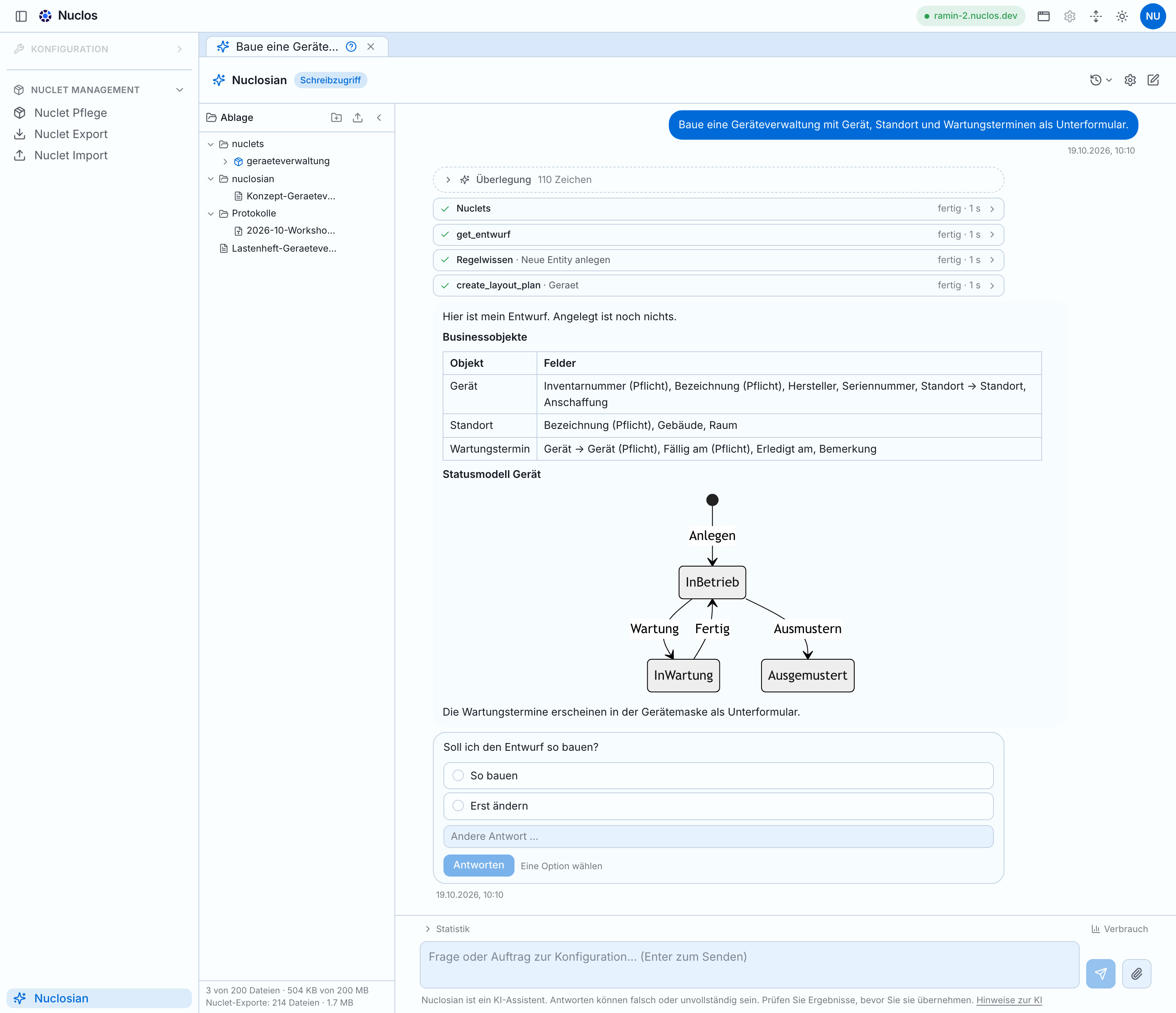
Tool cards show what Nuclosian is looking up or changing. “Show larger” enlarges the capture up to its original resolution. Scroll inside the frame.
Note on AI
You are working with an AI assistant, not a person. In write mode it writes directly into your Nuclos instance. The output is produced by a language model and can be factually wrong, even when it sounds convincing. Check the result in the configuration, especially changes to data, permissions, and rules.
Your input is sent to the model provider so it can answer. It is not used to train models. Details are in the AI notices and the privacy policy.
What is Nuclosian?
The AI assistant in the Nuclos web client’s configuration mode.
Name the Nuclos object, and describe in business language what should happen. Nuclosian applies that in the configuration: BusinessobjektOne unit of something the company manages. In the knowledge base and their attributes, MaskeThe data-entry screen of a business object: its fields and how they are arranged. In the knowledge base, StatusmodellWhich states a business object can take, and which transitions exist between them. In the knowledge base, RegelBusiness logic the other Nuclos mechanisms do not cover. In the knowledge base, ObjektgeneratorCreates a related business object from an existing one and copies the data across. In the knowledge base, jobs, user groups, permissions, and test data.
Nuclosian can
- explain how an existing NucletA building block an ERP on Nuclos is assembled from. In the knowledge base is built and what its RegelBusiness logic the other Nuclos mechanisms do not cover. In the knowledge base do,
- draft a proposal with a data model, a flow, a StatusmodellWhich states a business object can take, and which transitions exist between them. In the knowledge base, and a MaskeThe data-entry screen of a business object: its fields and how they are arranged. In the knowledge base,
- build, which creates the change directly in your Nuclos instance in write mode,
- query, for example “How many orders are there per customer?”, and create documents as PDF.
Behind Nuclosian is a knowledge base of reviewed Nuclos rules and patterns from real NucletA building block an ERP on Nuclos is assembled from. In the knowledge base. Before it builds anything, it consults that base instead of guessing.
Open Nuclosian
Three clicks to the first conversation.
Before you start
- You are signed in to the web client as a superuser. Only then do you see configuration mode.
- You are on a development instance. Nuclosian changes the configuration immediately and is not meant for production systems.
Open it
-
Configuration mode
Click the wrench icon at the top right (“Switch to configuration mode”).
-
Choose Nuclosian
In the configuration menu on the left, choose Nuclosian (the sparkle icon). On an empty configuration page there is also the button “Nuclosian öffnen (Konfiguration per KI)”.
-
Tab “Neuer Chat”
A new tab opens. On the start page Nuclosian introduces itself and suggests an example that fits the BusinessobjektOne unit of something the company manages. In the knowledge base on your instance.
-
Send a question
Type your question or task into the input field and press
Enter.
How a task gets built
For anything new or extended, Nuclosian follows a fixed sequence.
-
You describe the goal
Business language is enough: “We need leave management with approval by the manager.”
-
Nuclosian asks
Only at real forks, for example “Should remaining leave be calculated automatically?”.
-
Nuclosian presents a draft
With BusinessobjektOne unit of something the company manages. In the knowledge base and fields, the flow, the StatusmodellWhich states a business object can take, and which transitions exist between them. In the knowledge base as a diagram, RegelBusiness logic the other Nuclos mechanisms do not cover. In the knowledge base, and a MaskeThe data-entry screen of a business object: its fields and how they are arranged. In the knowledge base. Nothing is created yet.
-
You approve
On the card at the end: So bauen (Build it) or Erst ändern (Change it first). For “change it first”, write what should be different.
-
Nuclosian builds
The steps appear as cards. A plan card in the conversation shows progress (“3 of 7 done”).
-
You check the result
In application mode: open the MaskeThe data-entry screen of a business object: its fields and how they are arranged. In the knowledge base, create a record, change the state.
What it covers
What Nuclosian takes on in each area of the configuration. Keep these names in the prompt.
| Area | What Nuclosian does there |
|---|---|
| Nuclet | A building block an ERP on Nuclos is assembled from. The business application stays separate from Nuclos and is made of configuration. What Nuclosian builds lives in this nuclet. In the knowledge base |
| Businessobjekt | One unit of something the company manages. Examples are customer, item, and order. Nuclosian creates and extends them: attributes with type, required, default, and references, menu path, system identifier. In the knowledge base |
| Maske | The data-entry screen of a business object: its fields and how they are arranged. A layout sketch is the draft of that screen before anything is created. The wiki calls it a layout. Nuclosian builds new screens, rearranges existing ones, and adds tabs. There is a sketch before the build and a preview after. In the knowledge base |
| Unterformular | A list of related entries on the same screen, such as several maintenance dates on one device. Nuclosian adds them to the screen. In the knowledge base |
| Statusmodell | Which states a business object can take, and which transitions exist between them. For example ordered, delivered, paid. Nuclosian sets states, transitions, colours, and required fields per state, and shows the model as a diagram in the chat. In the knowledge base |
| Regel | Business logic the other Nuclos mechanisms do not cover. For example a check when saving. Nuclosian writes Java rules, on save, on state change, or as a job, has them compiled, and checks them by behaviour. In the knowledge base |
| Objektgenerator | Creates a related business object from an existing one and copies the data across. For example a quote becomes an order with all line items. Nuclosian sets up these follow-up documents. Jobs are the scheduled runs that go with them. In the knowledge base |
| Rechte | User groups, module rights, and field rights. Nuclosian explains them and creates them. In the knowledge base |
| Daten | Queries, reports, and realistic test data. Nuclosian creates them or removes them again. In the knowledge base |
| Dokumente | Concepts and summaries as PDF, including diagrams. They arrive as a download and in your file drawer. In the knowledge base |
| Hausregeln | Lasting instructions for all of your chats, such as naming conventions. They sit under Einstellungen, Hausregeln, up to 25 rules. In the knowledge base |
The list is not complete. Nuclosian also builds dashboards and print outputs, for example. In principle you can build with Nuclosian anything Nuclos can do.
The file drawer
Your personal file folder next to the chat.
Only you see what is in your drawer. Colleagues each have their own. Nuclosian can read from it, and documents it creates for you are stored there (in the folder nuclosian).
How to use it
- Show and hide it with “Ablage” in the left bar. The state is remembered.
- Add files by drag and drop or “Datei hinzufügen”. You cannot drop whole directories. Create a folder for that (nested is fine, for example
Verträge/2026) and drop the files into it. - Download, rename, delete via the actions on each file. Only a person can delete or rename. Nuclosian cannot.
- Limits: up to 200 files and 200 MB per person, at most 20 MB per file. The fill level is at the bottom of the bar.
How Nuclosian uses the drawer
Refer to your documents in the chat (“Read my specification”, “What does Tuesday’s minutes say?”). Nuclosian then searches specifically and reads only the file it needs. Before it reads a file for the first time, it asks your permission. If you decline, the file stays unread.
Nuclet export
Save, version, and roll out what Nuclosian has built.
Everything Nuclosian builds first lives only in the database of your instance. To save and version the changes, for example in a Git repository, you need a NucletA building block an ERP on Nuclos is assembled from. In the knowledge base export.
Two ways
| Way | How | Result |
|---|---|---|
| Download | Configuration menu → NucletA building block an ERP on Nuclos is assembled from. In the knowledge base Export → choose the NucletA building block an ERP on Nuclos is assembled from. In the knowledge base → Exportieren | A .nuclet file in the download folder on your computer |
| Into the drawer | In the same tool, choose “In die Nuclosian-Ablage exportieren, statt herunterzuladen”, name a target directory (for example nuclets/vertrieb), and click In die Ablage exportieren | The NucletA building block an ERP on Nuclos is assembled from. In the knowledge base unpacked as a folder in your drawer. Nuclosian can read it. |
The export directory in the drawer
- It is marked as an export directory. Neu exportieren fetches the current state in one click.
- Each export empties the directory and fills it again. A
.gitinside it is kept. Do not store your own files there. Use a separate folder. - Two exports of the same configuration produce the same files, without date noise. Differences between two snapshots are real changes.
- No longer needed? Exportverzeichnis wegräumen deletes it and its contents. You can fetch it again at any time.
Import on the production system
To roll the changes out, import the exported NucletA building block an ERP on Nuclos is assembled from.
In the knowledge base on the production system: there, in configuration mode, upload the .nuclet file via NucletA building block an ERP on Nuclos is assembled from.
In the knowledge base Import and click Importieren. You get the file from the “Download” path. The import overwrites the matching configuration on that system.
- Take a database backup of the production system first.
- On production systems, import is possible only in maintenance mode. The import tool offers to switch it on.
- Reload the client after the import so menu, MaskeThe data-entry screen of a business object: its fields and how they are arranged. In the knowledge base, and metadata show the new state.
Examples
Phrases to copy.
Two ways in. If a NucletA building block an ERP on Nuclos is assembled from. In the knowledge base is already there, start with “Learn a NucletA building block an ERP on Nuclos is assembled from. In the knowledge base”, in read-only mode. If the instance is empty, start with “Build a small application”. “Extend something that exists” needs a BusinessobjektOne unit of something the company manages. In the knowledge base Auftrag. “RegelBusiness logic the other Nuclos mechanisms do not cover. In the knowledge base and flows” also needs a BusinessobjektOne unit of something the company manages. In the knowledge base Angebot. Keep the marked names as they are. Describe what should happen in business language alongside them. The explanations are in What it covers.
Learn a NucletA building block an ERP on Nuclos is assembled from. In the knowledge base
Read-only mode is enough.
Erkläre mir den Aufbau meines NucletA building block an ERP on Nuclos is assembled from. In the knowledge base: Welche BusinessobjektOne unit of something the company manages. In the knowledge base, MaskeThe data-entry screen of a business object: its fields and how they are arranged. In the knowledge base und StatusmodellWhich states a business object can take, and which transitions exist between them. In the knowledge base gibt es?
Welche BusinessobjektOne unit of something the company manages. In the knowledge base haben noch kein StatusmodellWhich states a business object can take, and which transitions exist between them. In the knowledge base?
Erkläre mir, was die RegelBusiness logic the other Nuclos mechanisms do not cover. In the knowledge base am BusinessobjektOne unit of something the company manages. In the knowledge base Auftrag tun.
Build a small application
Nuclosian asks briefly, presents a draft with a MaskeThe data-entry screen of a business object: its fields and how they are arranged. In the knowledge base, and builds only after your “So bauen”. Then:
Baue eine Geräteverwaltung mit Gerät, Standort und Wartungsterminen als UnterformularA list of related entries on the same screen, such as several maintenance dates on one device. In the knowledge base.
Lege 10 Beispielgeräte an drei Standorten an.
Extend something that exists
Needs a BusinessobjektOne unit of something the company manages. In the knowledge base Auftrag.
Füge am BusinessobjektOne unit of something the company manages. In the knowledge base Auftrag ein Feld „Priorität“ hinzu, mit den Werten Niedrig, Mittel und Hoch.
Verschiebe in der MaskeThe data-entry screen of a business object: its fields and how they are arranged. In the knowledge base die Bemerkungen in einen eigenen Reiter.
Füge im StatusmodellWhich states a business object can take, and which transitions exist between them. In the knowledge base Auftrag einen StatusmodellWhich states a business object can take, and which transitions exist between them. In the knowledge base von „Abgeschlossen“ zurück nach „In Bearbeitung“ hinzu.
RegelBusiness logic the other Nuclos mechanisms do not cover. In the knowledge base and flows
Needs the BusinessobjektOne unit of something the company manages. In the knowledge base Angebot and Auftrag.
Schreib eine RegelBusiness logic the other Nuclos mechanisms do not cover. In the knowledge base am BusinessobjektOne unit of something the company manages. In the knowledge base Auftrag, die das Speichern verhindert, wenn das Lieferdatum vor dem Auftragsdatum liegt.
Lege einen ObjektgeneratorCreates a related business object from an existing one and copies the data across. In the knowledge base an, der aus einem Angebot einen Auftrag mit allen Positionen erzeugt.
Work with your own documents
Drop the specification into the drawer, then:
Lies mein Lastenheft und schlage vor, welche BusinessobjektOne unit of something the company manages. In the knowledge base wir dafür brauchen.
Fasse das Konzept als PDF zusammen, mit dem StatusmodellWhich states a business object can take, and which transitions exist between them. In the knowledge base als Diagramm.
Query
Zeig mir alle Aufträge im Status „In Bearbeitung“, die älter als 30 Tage sind.
Wie viele Aufträge gibt es pro Kunde?
Tips
What makes conversations faster, cheaper, and more accurate.
- Name the object, state the effect in business language. “Schreib eine RegelBusiness logic the other Nuclos mechanisms do not cover. In the knowledge base am BusinessobjektOne unit of something the company manages. In the knowledge base Auftrag: an order may be delivered only after it is paid.” The name is the configuration object. The sentence is what should happen. The names are in What it covers.
- Actually read the draft. That is the cheapest place to correct it. A missing field in the draft costs one sentence. After the build it costs a rework.
- One topic per chat. Open a new tab for a new task. Short conversations are faster, cheaper, and easier to follow.
- Export first. A NucletA building block an ERP on Nuclos is assembled from. In the knowledge base export before a larger change is your way back.
- Use house rules for instructions that always apply, such as “attribute names in German, camelCase”. Then you do not repeat them in every chat.
- Stop early. If Nuclosian heads the wrong way, click Stopp and say what you mean. That costs less than a finished wrong turn.
- Interrupted? Fortsetzen is enough. Nuclosian first checks what is already created, and does not build it twice.
- Check in application mode. Open the MaskeThe data-entry screen of a business object: its fields and how they are arranged. In the knowledge base, save a record, change the state. Only that shows whether it works as you wanted.
- Ask for diagrams. “Zeig mir das StatusmodellWhich states a business object can take, and which transitions exist between them. In the knowledge base als Diagramm” is faster to review than text.
- Point at documents precisely. “Read section 3 of the specification” is faster and cheaper than “read everything”.
If the connection fails
The panel marks where the chain breaks.
If a connection fails, the panel shows a status chain Client → Harness → Gateway → AI model instead of the conversation, and marks where it broke.
If it persists, write to support-nuclosian@nuclos.de.
Limits and safety
What to watch when you work with Nuclosian.
- Nuclosian is an AI assistant. Outputs are machine-generated. Answers can be wrong or incomplete. Check the result in the instance.
- Development instances only. Changes take effect immediately. For production use, Nuclosian belongs on its own instance.
- RechteUser groups, module rights, and field rights. In the knowledge base: Nuclosian acts in your name, with your login, and sees only what you are allowed to see. It never reads credentials or passwords.
- Wide-reaching actions such as deletes or mass changes are confirmed in the chat first.
- Usage: Every session costs Nuclosian units. You see the balance under Verbrauch (Usage). Billing follows the evaluation in our gateway.
- Privacy: Chats and the file drawer belong to you alone. Content Nuclosian reads is sent to the AI model for processing.
As of 18 October 2026. Names and limits match the current development state and can differ by installation.