
Individual ERP
Nuclosian AI
Bring workflows into the ERP yourself, no programming skills required
No programming skills required. You describe the process in business terms, and Nuclosian builds it in your instance. Many workflows live outside the ERP: in Excel, in Access, or in an application someone on the team built. With Nuclosian AI you bring that workflow into the ERP. Nuclos MCP is there for custom clients and integrations.
- No programming skills required
- The change lands directly in your instance
- Open source: ERP source code and data stay with you
Meet Nuclosian
A complaint example: the missing field on the case appears in the dialogue.
Below is the complaint example: the field "Affected batch". You describe it in business terms. Nuclosian creates it in the instance.
After a change to an existing mask or rule, a line compare with Undo follows while the previous version is still held in memory.
- Conversation You describe the field. Nuclosian answers in the chat.
- Write The write call creates the field directly in the instance.
- In the instance You see the change in the same session.
Flow in the client
Nuclosian
Writing into the instance
Waiting for the dialogue …
Proposal in the chat
First draft
- Field
- Required
- Scope
- State
Write
- Straight into the instance The write call creates the field.
- Rule on the server Rules are created and compiled.
- Your permissions The call runs in the signed-in person's session.
- Visible immediately You see the field on the same screen.
In the instance
Batch field · entity Complaint
- Field is in place The complaint has the field immediately.
- Same session You see the field on the same screen.
- Your permissions The write runs as the signed-in person.
- Line compare On an existing mask or rule, with Undo.
Signed-in session · your permissions
Simplified illustration.
Nuclosian in the client
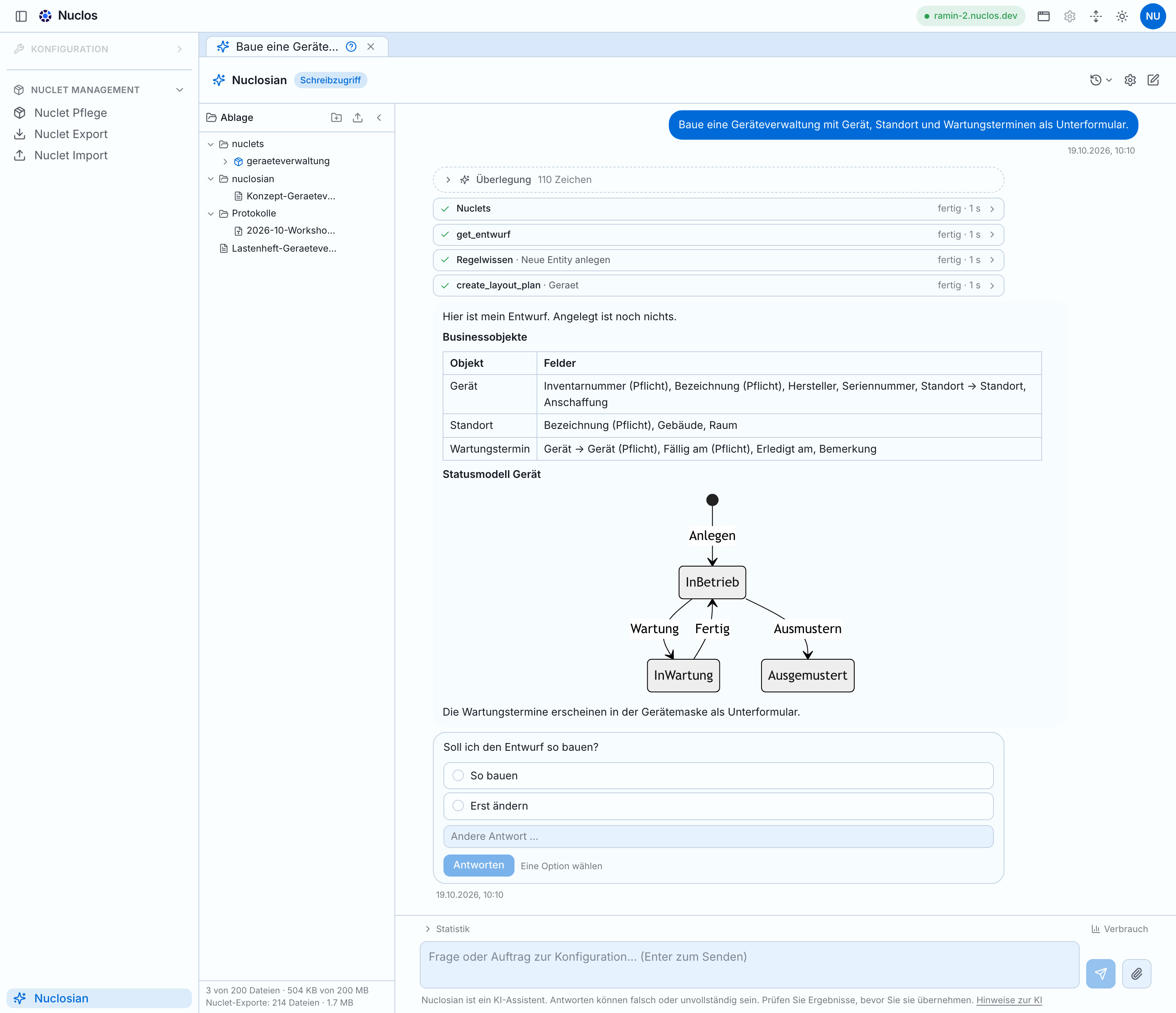
Write mode, file drawer, and decision card in the chat window. The short guide covers every control.
Does Nuclosian fit your workflow?
In 20 minutes you see, on a workflow like yours, how your description becomes the implementation.
Why Nuclosian AI
Build the workflow you already know, as part of the ERP. No separate delivery project.
The workflow you know
Complaints, approvals, batch tracking: you describe the case. Nuclosian programs the implementation.
Straight into the instance
The change sits in the system you work in. After a change to an existing mask or rule, a line compare with Undo follows.
Your description
You say what should happen. A separate delivery project is not required for that.
How solutions take shape
Three steps from the business description through to the change in the instance.
-
Context from the client
Nuclosian works with what you have open: name, selection, and the objects on screen. You do not type technical IDs.
-
Facts instead of guessing
Role, the Nuclos knowledge base, tool descriptions, and best practices feed the answer. The step retrieves what it needs.
-
Writing into the instance
In write mode the configuration changes when the tool is called. After a change to an existing mask or rule, a line compare with Undo appears while the previous version is still held in memory.
Security
Only people who may configure can write. Calls run in the session and are logged.
Configuration rights only
Nuclosian is open to superusers in configuration mode, the same access as manual configuration. Rights follow the signed-in person.
Straight into the instance
The change lands in the instance when the tool is called. Rules are created and compiled on the server. After a change to an existing mask or rule, a line compare with Undo follows.
Log and model
Calls and results are logged. Novabit operates the language model.
Nuclosian AI pricing
AI assistant and quota top-ups, booked individually. Offered exclusively to businesses (Section 14 German Civil Code). All prices excl. VAT. Public-sector customers: please contact us.
Additional usage quotas from €49, only with an active AI subscription. Top up in your account →
We recommend running production systems on Nuclos Cloud. Go to cloud hosting →
Nuclosian AI for developers
The same factual base is also available as MCP, with broader configuration options.
Most teams start with Nuclosian in the client. When your IT needs custom clients, apps, or integrations, the same tool layer is available as Nuclos MCP.
Knowledge base
Nuclos MCP for developers
How the MCP tool layer is embedded in Nuclosian AI, which domains the catalog covers, and what IT should watch for with session, permissions, and custom clients.
- MCP is the open tool layer for custom clients and integrations.
- One catalog: metadata, rules, layouts, entities, records, write actions.
- Same session as in the client: the signed-in person. The tools execute the write call.
Nuclosian AI FAQ
Short and concrete: Nuclosian, writes, MCP, and who Nuclosian AI is for.
- Are programming skills required?
- No. You describe the process in business terms, and Nuclosian builds it in your instance. Screens, fields, statuses, and approvals come from that description. A requirement outside those mechanisms remains a server-side rule in Java.
- What is Nuclosian AI?
- Nuclosian AI is where you bring a workflow into the ERP yourself. You describe what should happen. The implementation is programmed in your instance.
- What is Nuclosian?
- Nuclosian is the AI assistant in the Nuclos web client. You describe what should happen, and the implementation is programmed from that. Writes run as soon as the model calls the tool, in your session. It is open to superusers in configuration mode.
- What is Nuclos MCP?
- MCP (Model Context Protocol) is a tool layer for developers. The same factual and action base that sits with Nuclosian in the client is available for custom clients, apps, and integrations. The tools execute the write call in the signed-in person's session.
- Who is Nuclosian AI for, and when is Nuclos Enterprise the better fit?
- Nuclosian AI fits when processes change often or you prefer to build yourself. Nuclos Enterprise is guided delivery at a fixed price, in 30 days on agreed scope. Both use the same Nuclos 5 platform and can be combined.
- Do source code and data stay with us?
- Nuclos, Launcher, and Host are under the AGPL. ERP source code and data stay with you, on-premise or in the Nuclos Cloud. Novabit operates Nuclosian. Input, context, and answers go to the model provider. Details are in the AI notices.
Bring the workflow into the ERP yourself
Start a free 7-day trial, or take 20 minutes to see whether Nuclosian fits your workflow.
Free for 7 days · Straight into the instance · Open source